Meta is changing the WhatsApp Embedded Signup experience, and businesses and platforms using older versions need to prepare for an important deadline.
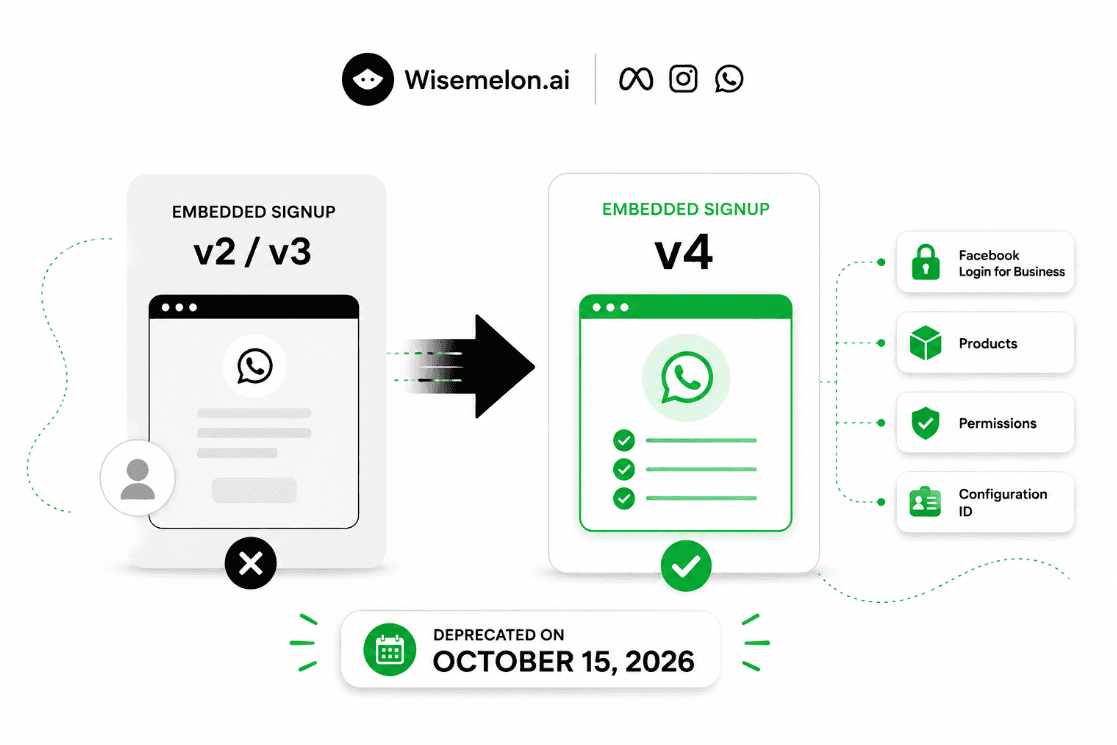
Embedded Signup v2 and v3 are scheduled for deprecation on October 15, 2026. Developers using these versions should migrate their integrations to Embedded Signup v4 before the deadline.
The change is more than simply updating a version number. Embedded Signup v4 introduces a configuration-driven approach using Facebook Login for Business.
This guide explains what is changing, who needs to migrate, what developers need to update, and what to test before October 15, 2026.
𝐖𝐡𝐚𝐭 𝐈𝐬 𝐖𝐡𝐚𝐭𝐬𝐀𝐩𝐩 𝐄𝐦𝐛𝐞𝐝𝐝𝐞𝐝 𝐒𝐢𝐠𝐧𝐮𝐩?
WhatsApp Embedded Signup allows platforms to provide a WhatsApp onboarding experience directly inside their own software.
Instead of asking every customer to manually configure their WhatsApp Business Account, phone number, permissions and other settings, a platform can guide the customer through Meta's onboarding flow.
It is commonly used by:
WhatsApp Tech Providers
ISVs
SaaS platforms
Agencies
Business messaging platforms
Other companies onboarding customers to WhatsApp
𝐖𝐡𝐚𝐭 𝐈𝐬 𝐂𝐡𝐚𝐧𝐠𝐢𝐧𝐠 𝐢𝐧 𝐄𝐦𝐛𝐞𝐝𝐝𝐞𝐝 𝐒𝐢𝐠𝐧𝐮𝐩 𝐯𝟒?
The biggest change is the move toward a configuration-driven onboarding model.
With v4, developers create a Facebook Login for Business configuration and define the products and permissions required for their onboarding flow.
The main areas developers need to review are:
Facebook Login for Business configuration
Products
Permissions
Configuration ID
Backend handling
Signup callbacks
Webhooks
Special onboarding scenarios
𝐯𝟐/𝐯𝟑 𝐯𝐬 𝐯𝟒
Older Embedded Signup integrations were built around previous versions of the flow.
With v4, the configuration becomes a central part of the onboarding process.
Instead of simply changing the Embedded Signup version, developers need to review the configuration, products, permissions and application logic supporting the flow.
𝐅𝐚𝐜𝐞𝐛𝐨𝐨𝐤 𝐋𝐨𝐠𝐢𝐧 𝐟𝐨𝐫 𝐁𝐮𝐬𝐢𝐧𝐞𝐬𝐬
Embedded Signup v4 uses Facebook Login for Business as the foundation for its configuration.
Developers need to create the appropriate configuration and select the products and permissions required by their application.
This configuration is then used by the Embedded Signup experience.
𝐖𝐡𝐞𝐧 𝐀𝐫𝐞 𝐄𝐦𝐛𝐞𝐝𝐝𝐞𝐝 𝐒𝐢𝐠𝐧𝐮𝐩 𝐯𝟐 𝐚𝐧𝐝 𝐯𝟑 𝐃𝐞𝐩𝐫𝐞𝐜𝐚𝐭𝐞𝐝?
The important deadline is:
October 15, 2026
Meta has announced that Embedded Signup v2 and v3 will be deprecated on this date.
If your platform still depends on an older implementation, migrate and test v4 before the deadline rather than waiting until October.
Official Meta documentation:
https://developers.facebook.com/documentation/business-messaging/whatsapp/embedded-signup/versions
𝐖𝐡𝐨 𝐍𝐞𝐞𝐝𝐬 𝐭𝐨 𝐌𝐢𝐠𝐫𝐚𝐭𝐞?
𝐖𝐡𝐚𝐭𝐬𝐀𝐩𝐩 𝐓𝐞𝐜𝐡 𝐏𝐫𝐨𝐯𝐢𝐝𝐞𝐫𝐬
If your platform provides WhatsApp onboarding for customers, check which Embedded Signup version your integration currently uses.
𝐈𝐒𝐕𝐬
If your software allows customers to connect or configure WhatsApp, review your existing Embedded Signup implementation.
𝐒𝐚𝐚𝐒 𝐏𝐥𝐚𝐭𝐟𝐨𝐫𝐦𝐬
If WhatsApp onboarding is built into your SaaS product, your signup flow may need to be updated.
𝐀𝐠𝐞𝐧𝐜𝐢𝐞𝐬
Agencies with custom WhatsApp onboarding implementations should check whether they rely on older Embedded Signup versions.
𝐁𝐒𝐏𝐬 𝐚𝐧𝐝 𝐒𝐨𝐥𝐮𝐭𝐢𝐨𝐧 𝐏𝐫𝐨𝐯𝐢𝐝𝐞𝐫𝐬
Any platform maintaining its own Embedded Signup integration should review the migration requirements.
𝐖𝐡𝐢𝐜𝐡 𝐈𝐧𝐭𝐞𝐠𝐫𝐚𝐭𝐢𝐨𝐧𝐬 𝐍𝐞𝐞𝐝 𝐄𝐱𝐭𝐫𝐚 𝐀𝐭𝐭𝐞𝐧𝐭𝐢𝐨𝐧?
Not every integration will have the same migration requirements.
Developers should pay particular attention if their implementation supports:
WhatsApp Coexistence
WABA sharing
Marketing Messages Lite
Existing WhatsApp Business App users
Custom onboarding logic
These flows may have additional requirements, so don't assume that simply changing the Embedded Signup implementation is enough.
𝐖𝐡𝐚𝐭 𝐂𝐡𝐚𝐧𝐠𝐞𝐬 𝐢𝐧 𝐭𝐡𝐞 𝐯𝟒 𝐂𝐨𝐧𝐟𝐢𝐠𝐮𝐫𝐚𝐭𝐢𝐨𝐧?
𝐅𝐚𝐜𝐞𝐛𝐨𝐨𝐤 𝐋𝐨𝐠𝐢𝐧 𝐟𝐨𝐫 𝐁𝐮𝐬𝐢𝐧𝐞𝐬𝐬 𝐂𝐨𝐧𝐟𝐢𝐠𝐮𝐫𝐚𝐭𝐢𝐨𝐧
The v4 flow uses a Facebook Login for Business configuration.
Create the configuration required for your onboarding experience and connect it to the Embedded Signup flow.
𝐏𝐫𝐨𝐝𝐮𝐜𝐭 𝐒𝐞𝐥𝐞𝐜𝐭𝐢𝐨𝐧
Select the Business Messaging products your application actually needs.
Don't enable products simply because they are available.
𝐏𝐞𝐫𝐦𝐢𝐬𝐬𝐢𝐨𝐧𝐬
Review the permissions required by your application.
A customer successfully completing login does not necessarily mean your backend has every permission required for subsequent API operations.
𝐂𝐨𝐧𝐟𝐢𝐠𝐮𝐫𝐚𝐭𝐢𝐨𝐧 𝐈𝐃
Your application needs to use the appropriate configuration ID when launching the Embedded Signup flow.
Make sure your frontend and backend are using the new v4 configuration rather than an older configuration.
𝐖𝐡𝐚𝐭 𝐇𝐚𝐩𝐩𝐞𝐧𝐬 𝐭𝐨 𝐄𝐱𝐢𝐬𝐭𝐢𝐧𝐠 𝐯𝟐/𝐯𝟑 𝐈𝐧𝐭𝐞𝐠𝐫𝐚𝐭𝐢𝐨𝐧𝐬?
Don't assume an existing integration will automatically become v4.
The migration needs to be handled at the integration level.
A practical migration looks like:
Existing v2/v3 integration
↓
Create v4 configuration
↓
Update implementation
↓
Test onboarding
↓
Test backend handling
↓
Move production onboarding to v4
↓
Retire the old implementation
𝐇𝐨𝐰 𝐭𝐨 𝐌𝐢𝐠𝐫𝐚𝐭𝐞 𝐖𝐡𝐚𝐭𝐬𝐀𝐩𝐩 𝐄𝐦𝐛𝐞𝐝𝐝𝐞𝐝 𝐒𝐢𝐠𝐧𝐮𝐩 𝐭𝐨 𝐯𝟒
𝐒𝐭𝐞𝐩 𝟏: 𝐈𝐝𝐞𝐧𝐭𝐢𝐟𝐲 𝐘𝐨𝐮𝐫 𝐂𝐮𝐫𝐫𝐞𝐧𝐭 𝐕𝐞𝐫𝐬𝐢𝐨𝐧
First determine exactly which Embedded Signup version your application currently uses.
Also identify whether your implementation includes special flows such as Coexistence or WABA sharing.
𝐒𝐭𝐞𝐩 𝟐: 𝐂𝐫𝐞𝐚𝐭𝐞 𝐭𝐡𝐞 𝐯𝟒 𝐂𝐨𝐧𝐟𝐢𝐠𝐮𝐫𝐚𝐭𝐢𝐨𝐧
Create the required Facebook Login for Business configuration.
Select Embedded Signup and choose the products and permissions required by your platform.
𝐒𝐭𝐞𝐩 𝟑: 𝐔𝐩𝐝𝐚𝐭𝐞 𝐘𝐨𝐮𝐫 𝐀𝐩𝐩𝐥𝐢𝐜𝐚𝐭𝐢𝐨𝐧
Update the Embedded Signup implementation to use the new v4 configuration.
Make sure your application is no longer relying on the old version-specific configuration.
𝐒𝐭𝐞𝐩 𝟒: 𝐑𝐞𝐯𝐢𝐞𝐰 𝐘𝐨𝐮𝐫 𝐁𝐚𝐜𝐤𝐞𝐧𝐝
Check everything your backend receives and processes after signup.
Review:
Access tokens
WABA information
Phone numbers
Permissions
Configuration information
Webhook setup
Customer/account mapping
𝐒𝐭𝐞𝐩 𝟓: 𝐓𝐞𝐬𝐭 𝐭𝐡𝐞 𝐂𝐨𝐦𝐩𝐥𝐞𝐭𝐞 𝐒𝐢𝐠𝐧𝐮𝐩 𝐅𝐥𝐨𝐰
Don't test only the login screen.
Complete the entire process from customer login through WhatsApp account and phone-number setup.
𝐒𝐭𝐞𝐩 𝟔: 𝐓𝐞𝐬𝐭 𝐒𝐩𝐞𝐜𝐢𝐚𝐥 𝐅𝐥𝐨𝐰𝐬
If your platform supports Coexistence, WABA sharing or Marketing Messages Lite, test those flows separately.
𝐒𝐭𝐞𝐩 𝟕: 𝐌𝐨𝐯𝐞 𝐏𝐫𝐨𝐝𝐮𝐜𝐭𝐢𝐨𝐧 𝐂𝐮𝐬𝐭𝐨𝐦𝐞𝐫𝐬
Once the v4 flow is stable, move your production onboarding process to v4.
Don't wait until October 15 to make the production switch.
𝐖𝐡𝐚𝐭 𝐃𝐞𝐯𝐞𝐥𝐨𝐩𝐞𝐫𝐬 𝐒𝐡𝐨𝐮𝐥𝐝 𝐓𝐞𝐬𝐭 𝐁𝐞𝐟𝐨𝐫𝐞 𝐎𝐜𝐭𝐨𝐛𝐞𝐫 𝟏𝟓
𝐋𝐨𝐠𝐢𝐧
Can the customer successfully complete Facebook Login for Business?
𝐏𝐞𝐫𝐦𝐢𝐬𝐬𝐢𝐨𝐧𝐬
Are all required permissions granted?
𝐖𝐀𝐁𝐀
Can the customer create or select the correct WhatsApp Business Account?
𝐏𝐡𝐨𝐧𝐞 𝐍𝐮𝐦𝐛𝐞𝐫
Can the phone number be registered successfully?
𝐖𝐞𝐛𝐡𝐨𝐨𝐤𝐬
Are webhook subscriptions and events working correctly?
𝐂𝐨𝐞𝐱𝐢𝐬𝐭𝐞𝐧𝐜𝐞
If supported, can an existing WhatsApp Business App user complete the onboarding process?
𝐄𝐱𝐢𝐬𝐭𝐢𝐧𝐠 𝐂𝐮𝐬𝐭𝐨𝐦𝐞𝐫𝐬
Can your platform continue working correctly with existing WABAs and phone numbers?
𝐁𝐚𝐜𝐤𝐞𝐧𝐝 𝐌𝐚𝐩𝐩𝐢𝐧𝐠
Does your system correctly associate newly onboarded WhatsApp assets with the correct customer account in your platform?
𝐂𝐨𝐦𝐦𝐨𝐧 𝐄𝐦𝐛𝐞𝐝𝐝𝐞𝐝 𝐒𝐢𝐠𝐧𝐮𝐩 𝐯𝟒 𝐌𝐢𝐠𝐫𝐚𝐭𝐢𝐨𝐧 𝐏𝐫𝐨𝐛𝐥𝐞𝐦𝐬
𝐔𝐬𝐢𝐧𝐠 𝐭𝐡𝐞 𝐎𝐥𝐝 𝐂𝐨𝐧𝐟𝐢𝐠𝐮𝐫𝐚𝐭𝐢𝐨𝐧
Creating a v4 configuration doesn't help if your application is still launching the old configuration.
𝐌𝐢𝐬𝐬𝐢𝐧𝐠 𝐏𝐞𝐫𝐦𝐢𝐬𝐬𝐢𝐨𝐧𝐬
The signup may appear successful, but later API requests can fail because the required permissions weren't configured correctly.
𝐁𝐚𝐜𝐤𝐞𝐧𝐝 𝐀𝐬𝐬𝐮𝐦𝐩𝐭𝐢𝐨𝐧𝐬
Your backend may have been designed around the old onboarding flow.
Review the data your application expects after signup.
𝐂𝐨𝐞𝐱𝐢𝐬𝐭𝐞𝐧𝐜𝐞 𝐈𝐬𝐬𝐮𝐞𝐬
Don't assume the normal Cloud API onboarding process and Coexistence behave exactly the same way.
Test them independently.
𝐓𝐞𝐬𝐭𝐢𝐧𝐠 𝐎𝐧𝐥𝐲 𝐎𝐧𝐞 𝐂𝐮𝐬𝐭𝐨𝐦𝐞𝐫
A single successful test isn't enough.
Test different scenarios:
New WABA
Existing WABA
New phone number
Existing WhatsApp Business App number
User cancellation
Failed login
Missing permission
Repeated onboarding
𝐄𝐦𝐛𝐞𝐝𝐝𝐞𝐝 𝐒𝐢𝐠𝐧𝐮𝐩 𝐯𝟒 𝐌𝐢𝐠𝐫𝐚𝐭𝐢𝐨𝐧 𝐂𝐡𝐞𝐜𝐤𝐥𝐢𝐬𝐭
Before October 15, make sure you have:
Identified your current Embedded Signup version
Created the v4 Facebook Login for Business configuration
Selected the required products
Configured required permissions
Added the new configuration ID
Updated your frontend implementation
Updated backend handling
Tested WABA creation
Tested phone-number registration
Tested webhooks
Tested Coexistence if supported
Tested WABA sharing if supported
Reviewed Marketing Messages Lite if supported
Tested existing customer accounts
Tested production onboarding
Removed dependencies on the deprecated flow
𝐖𝐢𝐥𝐥 𝐄𝐱𝐢𝐬𝐭𝐢𝐧𝐠 𝐂𝐮𝐬𝐭𝐨𝐦𝐞𝐫𝐬 𝐁𝐞 𝐀𝐟𝐟𝐞𝐜𝐭𝐞𝐝?
The migration primarily affects the platform's Embedded Signup integration.
Existing customers do not necessarily need to repeat their WhatsApp onboarding simply because your platform moves its signup flow to v4.
However, you should test how your application handles existing WABAs, phone numbers, permissions and customer records.
The bigger risk is leaving new-customer onboarding dependent on a deprecated implementation.
𝐖𝐡𝐚𝐭 𝐒𝐡𝐨𝐮𝐥𝐝 𝐃𝐞𝐯𝐞𝐥𝐨𝐩𝐞𝐫𝐬 𝐃𝐨 𝐍𝐨𝐰?
Don't treat October 15 as the date to start the migration.
A better approach is:
Audit
↓
Identify affected integrations
↓
Create v4 configuration
↓
Update the implementation
↓
Test every onboarding scenario
↓
Move production onboarding
↓
Monitor the new flow
𝐅𝐢𝐧𝐚𝐥 𝐓𝐡𝐨𝐮𝐠𝐡𝐭𝐬
WhatsApp Embedded Signup v4 is more than a version upgrade.
It changes how developers configure and manage the onboarding experience through Facebook Login for Business.
For platforms that still use Embedded Signup v2 or v3, the important date is October 15, 2026.
The safest approach is to migrate early, test the complete onboarding journey, and pay special attention to Coexistence, WABA sharing and other custom flows.
Don't wait until the deprecation date to discover that one part of your WhatsApp onboarding system still depends on the old implementation.
𝐅𝐫𝐞𝐪𝐮𝐞𝐧𝐭𝐥𝐲 𝐀𝐬𝐤𝐞𝐝 𝐐𝐮𝐞𝐬𝐭𝐢𝐨𝐧𝐬
𝐖𝐡𝐚𝐭 𝐢𝐬 𝐖𝐡𝐚𝐭𝐬𝐀𝐩𝐩 𝐄𝐦𝐛𝐞𝐝𝐝𝐞𝐝 𝐒𝐢𝐠𝐧𝐮𝐩 𝐯𝟒?
WhatsApp Embedded Signup v4 is Meta's newer configuration-driven onboarding architecture for Business Messaging integrations. It uses Facebook Login for Business configurations to define the products and permissions required by the onboarding experience.
𝐖𝐡𝐞𝐧 𝐢𝐬 𝐄𝐦𝐛𝐞𝐝𝐝𝐞𝐝 𝐒𝐢𝐠𝐧𝐮𝐩 𝐯𝟐 𝐝𝐞𝐩𝐫𝐞𝐜𝐚𝐭𝐞𝐝?
Meta has announced that Embedded Signup v2 will be deprecated on October 15, 2026.
𝐖𝐡𝐞𝐧 𝐢𝐬 𝐄𝐦𝐛𝐞𝐝𝐝𝐞𝐝 𝐒𝐢𝐠𝐧𝐮𝐩 𝐯𝟑 𝐝𝐞𝐩𝐫𝐞𝐜𝐚𝐭𝐞𝐝?
Meta's current announcement states that Embedded Signup v2 and v3 will be deprecated on October 15, 2026.
𝐖𝐡𝐚𝐭 𝐡𝐚𝐩𝐩𝐞𝐧𝐬 𝐨𝐧 𝐎𝐜𝐭𝐨𝐛𝐞𝐫 𝟏𝟓, 𝟐𝟎𝟐𝟔?
Embedded Signup v2 and v3 reach their deprecation date. Platforms still relying on the older implementations should have migrated their onboarding integration to v4 before this date.
𝐃𝐨 𝐚𝐥𝐥 𝐄𝐦𝐛𝐞𝐝𝐝𝐞𝐝 𝐒𝐢𝐠𝐧𝐮𝐩 𝐢𝐧𝐭𝐞𝐠𝐫𝐚𝐭𝐢𝐨𝐧𝐬 𝐧𝐞𝐞𝐝 𝐦𝐚𝐧𝐮𝐚𝐥 𝐦𝐢𝐠𝐫𝐚𝐭𝐢𝐨𝐧?
Any integration using the deprecated versions needs to be reviewed and migrated. The amount of work depends on the implementation and the features it supports.
𝐃𝐨𝐞𝐬 𝐯𝟒 𝐬𝐮𝐩𝐩𝐨𝐫𝐭 𝐖𝐡𝐚𝐭𝐬𝐀𝐩𝐩 𝐂𝐨𝐞𝐱𝐢𝐬𝐭𝐞𝐧𝐜𝐞?
Yes. Meta provides support for onboarding WhatsApp Business App users through the newer Embedded Signup flow. Coexistence should be tested separately because it has additional onboarding requirements.
𝐖𝐡𝐚𝐭 𝐢𝐬 𝐭𝐡𝐞 𝐝𝐢𝐟𝐟𝐞𝐫𝐞𝐧𝐜𝐞 𝐛𝐞𝐭𝐰𝐞𝐞𝐧 𝐄𝐦𝐛𝐞𝐝𝐝𝐞𝐝 𝐒𝐢𝐠𝐧𝐮𝐩 𝐯𝟐 𝐚𝐧𝐝 𝐯𝟒?
The major difference is the architecture. v4 uses a configuration-driven model based on Facebook Login for Business, while older versions use the previous Embedded Signup implementation.
𝐃𝐨 𝐈 𝐧𝐞𝐞𝐝 𝐚 𝐧𝐞𝐰 𝐅𝐚𝐜𝐞𝐛𝐨𝐨𝐤 𝐋𝐨𝐠𝐢𝐧 𝐟𝐨𝐫 𝐁𝐮𝐬𝐢𝐧𝐞𝐬𝐬 𝐜𝐨𝐧𝐟𝐢𝐠𝐮𝐫𝐚𝐭𝐢𝐨𝐧?
Yes. The v4 migration requires developers to create and configure the appropriate Facebook Login for Business setup for their Embedded Signup experience.
𝐖𝐢𝐥𝐥 𝐞𝐱𝐢𝐬𝐭𝐢𝐧𝐠 𝐜𝐮𝐬𝐭𝐨𝐦𝐞𝐫𝐬 𝐛𝐞 𝐚𝐟𝐟𝐞𝐜𝐭𝐞𝐝?
Not necessarily. The migration primarily affects the onboarding integration. However, developers should test existing WABAs, phone numbers and customer mappings to make sure the migration does not affect existing platform functionality.
𝐇𝐨𝐰 𝐝𝐨 𝐈 𝐭𝐞𝐬𝐭 𝐄𝐦𝐛𝐞𝐝𝐝𝐞𝐝 𝐒𝐢𝐠𝐧𝐮𝐩 𝐯𝟒?
Create the v4 configuration, run the complete onboarding flow, and test login, permissions, WABA creation or selection, phone-number registration, webhooks, backend handling and any special flows supported by your platform.