Workspace · Staff & Access Management
Bring your entire
care team together.
Give every team their own workspace, views and access — built around the work they actually do.
- 18 departments
- 143 staff
- 12 roles
Clinical teams
- Nursing18
- Doctors & clinical14
- Diagnostics9
- Medical Records12
- Pharmacy6
Patient operations
- Front Desk11
- Patient Experience9
- Billing8
- Insurance & TPA5
- Facilities7
- Help Desk4
Growth & engagement
- Sales8
- Marketing6
- Patient Outreach5
- Partnerships3
Management
- Department Heads9
- Operations6
- Administrators3
One organisation. Every team connected.
Team workspaces
One platform. Different workspaces for every team.
Everyone uses Wisemelon, but they don’t all need to see the same thing. Each team gets a workspace built around its own responsibilities.
View workspace as
Nursing workspace
- My work8Patient requests
- Needs me3Need attention
- From the team2Team updates
- Room 304 · Nursing assistanceRaised 6 minutes agoUrgent
- Room 208 · Patient requestWater and a blanketAssigned
- Room 412 · Follow-upPost-procedure observationIn progress
Sales workspace
- Today24New enquiries
- Open11Follow-ups
- This week3Conversions
- Corporate health check · 180 employeesProposal sentFollow-up
- Diagnostics package · walk-in enquiryConfirmed for ThursdayConverted
- Insurance tie-up · renewalAwaiting documentsOpen
Marketing workspace
- Running6Active campaigns
- Average82%Engagement
- This month148Leads generated
- Preventive health campWhatsApp · 4,200 reachedLive
- Cardiology awarenessScheduled for MondayQueued
- Annual check-up reminderDraft awaiting approvalDraft
Operations workspace
- Right now43Open requests
- Needs a head8Escalated
- This month94%Within target
- Facilities · 4 requests overdueThird floor, since yesterdayEscalated
- Billing · 7 unresolvedCarried over from MondayOpen
- Medical Records · clearedAll requests closed todayDone
Same platform. Different responsibilities. Different workspace.
On the floor
The workspace goes with your team.
Most of a hospital’s work does not happen at a desk. Give every team member the same workspace on their phone — the work they own, where they are standing.
- Follow-ups11
- New enquiries7
- Conversions3
Good morning, SnehaWard B · rooms 301–418
My work
- Patient requests8
- Need attention3
- Team updates2
- Room 304Nursing assistanceUrgent
- Room 208Patient requestAssigned
- Open requests43
- Escalated8
- Within target94%
Your workspace. Wherever you work.
Voice updates
Update your work without stopping what you’re doing.
Where voice input is enabled, staff can add a note or move a request on by speaking instead of typing — mid-round, gloves on, hands full.
- Speak
- Update
- Done
No new app and no separate assistant — it is the same workspace, with one more way to reach it.
Available to
- Nursing
- Facilities
- Front Desk
- Medical Records
- Patient Experience
Hold to speak
“Room 304 needs a nurse review. Mark it urgent.”
Request #2085 Updated
Nursing assistance
- Priority
- Urgent
- Status
- In progress
- Note
- Added
Less typing. Faster updates.
Roles and access
Give people access based on their role.
A role decides what someone can see and what they can do. Change someone’s role and their workspace changes with it — there is nothing to configure twice.
- Patient informationOwn department
- Patient communicationOwn department
- TicketsView and assign
- Department reportsFull
- Team activityOwn team
- Campaign managementNo access
- Organisation settingsNo access
Setting one up
- 1Create the role
- 2Select its permissions
- 3Assign staff to it
- Role
- Department Head
- Workspace
- Medical Records
- Status
- Active
| Role | Patients | Tickets | Reports | Campaigns | Settings |
|---|---|---|---|---|---|
| Front Desk | Yes | Yes | No | No | No |
| Nurse | Yes | Yes | Limited | No | No |
| Department Head | Yes | Yes | Yes | No | No |
| Administrator | Yes | Yes | Yes | Yes | Yes |
Staff and departments
Keep your teams organised as they grow.
Manage staff, departments and roles from one place. This is not an HR system — there is no payroll, attendance, leave or recruitment here, and there is not meant to be.
- All staff 143
- Nursing 18
- Medical Records 12
- Billing 8
- Patient Experience 9
- Facilities 7
- Sales 8
- Marketing 6
| Staff | Role | Status |
|---|---|---|
| RSRahul Sharma | Department Head | Active |
| PRPriya Rao | Manager | Active |
| AKAnkit Kumar | Executive | Active |
Staff profile
- Name
- Rahul Sharma
- Department
- Medical Records
- Role
- Department Head
- Workspace
- Medical Records
- Access
- Department level
- Status
- Active
Want to see your own departments in it?
We’ll set up the teams, roles and workspaces you actually run.
Working together
Keep teams connected around the work.
A short internal conversation on the request itself, so the handover is on the record rather than in someone’s messages.
Rahul · 11:04Report is ready. Please verify before sending.
Priya · 11:09Verified against the admission record.
Rahul · 11:15Sending to the patient now.
Resolved
The conversation stays on the request, not in a side channel. Ticketing owns the request itself.
Team performance
See how your teams are working.
Activity, completed work and where things are piling up — so a department head can offer help before a shift ends, rather than chase updates after it.
- Today287Completed
- Today42Pending
- Today18Overdue
- AMArjun M.16 completed today4 pending
- SNSneha N.24 completed today3 pending
- RSRahul S.18 completed today2 pending
- PRPriya R.21 completed today1 pending
Ordered by what is still open, not by who has done the most.
Know where work is moving, where teams need support, and what has been completed.
The daily report
Know what happened today.
One summary for department heads and leadership, at the end of the day, without opening the dashboard.
- 287Tasks completed
- 42Pending
- 18Overdue
- 94.6%Completed within target
Today’s highlights
- Medical Records48 tasks completed
- Nursing71 tasks completed
- Facilities4 requests overdue
- Patient Experience12% more requests handled than yesterday
View full report
- Dashboard — what is happening now
- Daily report — what happened today
One view, four scales
See the whole organisation without losing the individual view.
- StaffMy work — what this one person owns today.
- TeamTeam activity — who is carrying what.
- DepartmentDepartment performance — completed, pending, overdue.
- OrganisationThe whole picture — every department at once.
Everyone sees what they need. Leaders see what matters.
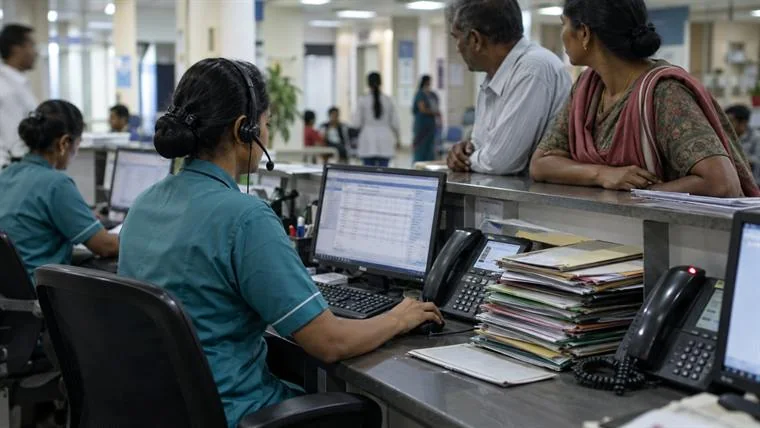
Everyone has a role. Everyone has a workspace.
- Nursing18 people
- Medical Records12 people
- Patient Experience9 people
- Operations6 people
The boundary
Who can reach what — and nothing beyond that.
Staff & Access Management decides who works here and what they can access. Three neighbours handle the rest, and keeping them separate is what stops any of them becoming a settings page.
- You are hereStaff & AccessWho works here and what they can reach.
- Internal ViewsHow teams organise what they see.
- Tags & SegmentationHow records are grouped.
- Workflow OrchestrationHow work moves between people.
FAQ
Frequently asked questions
What is Staff & Access Management in Wisemelon?
Staff & Access Management helps healthcare organisations manage staff, departments, roles, permissions and workspace access from one place. Each team member can have a workspace based on their responsibilities.
Can different departments have different dashboards?
Yes. Teams such as Nursing, Front Desk, Medical Records, Billing, Facilities, Sales, Marketing and Patient Experience can have their own dashboards, views and workspaces.
Can each staff member have their own access and permissions?
Yes. Access can be configured based on each person’s role and responsibilities, so staff can see and use the information and functions relevant to their work.
Can hospitals create custom roles?
Yes. Organisations can create roles with specific permissions and assign those roles to individual staff members or teams.
Can managers see what their teams are doing?
Yes. Managers can view team activity, assigned work, completed tasks, pending work and other relevant performance information from their workspace.
Can hospitals receive daily team performance reports?
Yes. Daily reports can show completed work, pending tasks, overdue items, team activity and other relevant performance metrics across departments.
Can staff use Wisemelon from their mobile devices?
Yes. Staff can access their workspace from mobile devices to view work, respond to requests and update information while working away from their desks. Voice input can also make quick updates easier where enabled.
How is Staff & Access Management different from Workflow Orchestration?
Staff & Access Management controls who can access what and how each team member works within Wisemelon. Workflow Orchestration controls how work moves between people, teams, systems and processes.